Dtravel Booking Widget
Written By Jayson
Last updated About 1 year ago
Please refer to the instructions below to install the Dtravel booking widget on your website. If there are any issues, please let us know at support@dtravel.com.
Demo link: https://sdk.dtravel.com/
1. Add script to body
Required:
Source: https://sdk.dtravel.com/static/dtravel.sdk.js?userId={host_user_id}&propertyId={property_id}

2. Open popup
Add Book property button anywhere on your website, add onClick event into this button, and call window.openDtravelWidget() function to open the popup.
Open popup: call function window.openDtravelWidget() (function is defined in script and added to Window object of browser).
Example: function openWidget() { window.openDtravelWidget() }
Close popup: call function window.closeDtravelWidget()
Example: function closeWidget() { window.closeDtravelWidget()
Notes
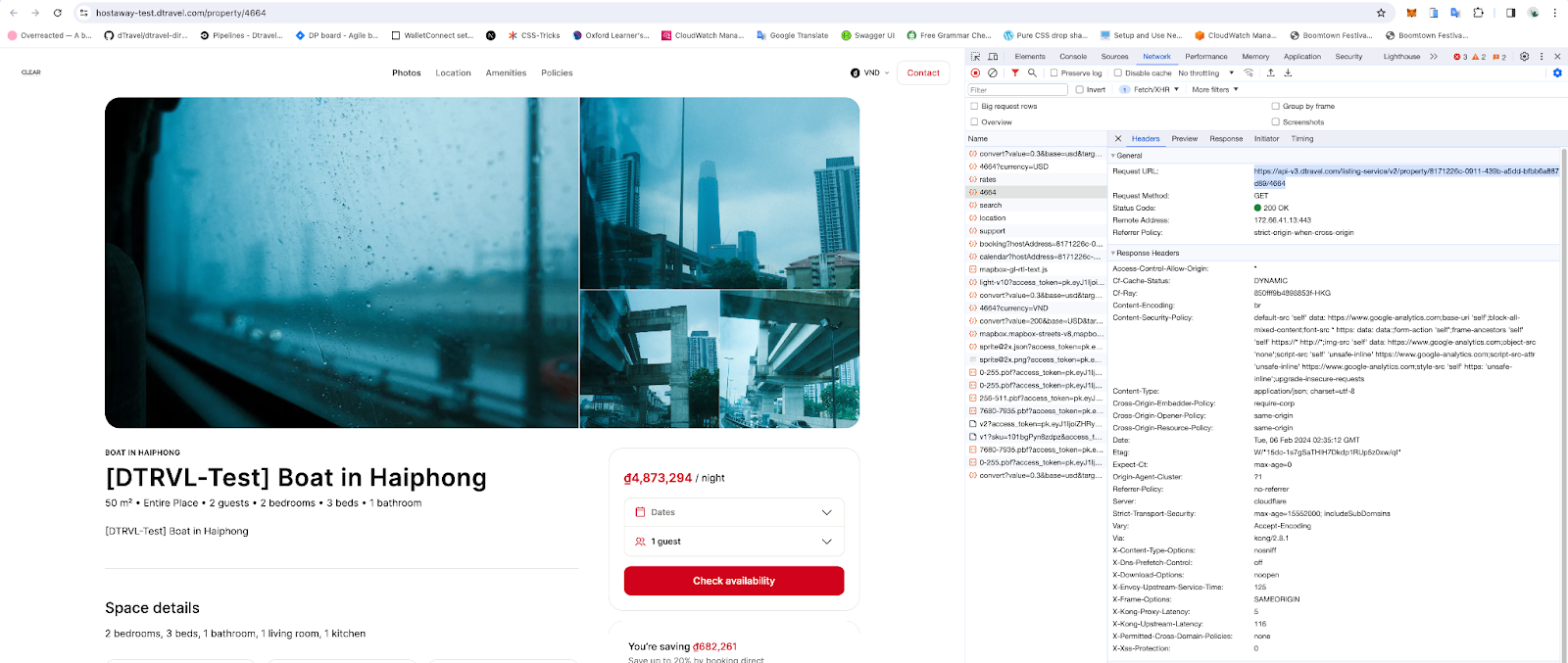
How to get userId:
Example:
F12, open the “Network” tab, and find API:
UserId = 8171226c-0911-439b-a5dd-bfbb6a887d89 and propertyId = 4664
Use these 2 fields to add to the script
Still need help? Ask the team